β±οΈ Do It Now
Create a OneNote Page and copy this into the title:
Lesson 5 - Summer 1 - Consolidation Lesson
Copy this into a OneNote Page and complete it
|
π Do It Now |
|
Answer each of the following: (1) Explain why it is best practice to keep all images used on a website in a separate folder
(2) Identify the tag used to add images to a webpage
(3) Explain why width="100%" is added to the image tag
Extension: Research whether JPEG or PNG images are the most suitable to use when creating a website. Explain your findings.
|
π― Learning Objectives
- LO1: Be able to create new HTML webpages
- LO2: Continue to edit HTML on our site
πCreating New Pages
You will now learn how to make additional pages for your website
π₯ Making additional pages for your siteWe won't link them together this particular lesson
You are just being shown so you can start to add content to the pages
Click for new page template code
<!DOCTYPE html>
<html>
<head>
<title>My Website</title>
<link rel="stylesheet" href="styles.css" />
<link rel="icon" href="favicon.ico" type="image/x-icon" />
<script type="text/javascript" src="script.js"></script>
</head>
<body>
<!-- Content Goes here! -->
</body>
</html>
Useful HTML Elements
Below are some useful HTML Elements for you to work with
- <h1> Content for Main Heading </h1>
- <h2> Content for Subheading </h2>
- <p> Content for a paragraph </p>
- <img src"images/someImage.png" width="100%" >
CSS
Some Useful Examples of CSS
h1{
color:green;
font-family:'Gill Sans', 'Gill Sans MT';
}
body{
background-color:#00ff00;
}
h2{
color:green;
font-family:'Gill Sans', 'Gill Sans MT';
}
p{
color:green;
font-family:'Gill Sans', 'Gill Sans MT';
}
<> Add a New Image To A Webpage <>
Watch This video to see how an image can be added to your webpage
<> Image Effects <>
You can add borders and rounded edges to images.
The code for this
<img src="images/button-moon.png" style=" width:200px; border:8px solid red; border-radius:100px; ">
<> Using a Flex Box <>
Anything you put within a flex box will appear side by side
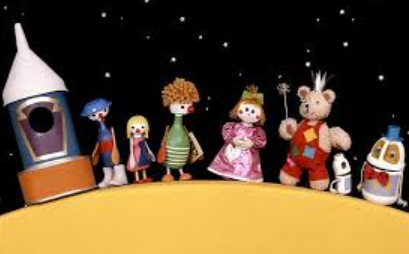
Button moon was a popular children's television series during the mid 1980s. It featured a whole host of characters on the moon!
The code for this
<div style=" display:flex; width:50%; border:5px solid blue; padding:5px; background-color:grey; border-radius:20px; "> <!-- Put your content here --> </div>